Maria, the HR manager at an installation company, spends more than three hours every month cross-referencing spreadsheets to check which certificates are expiring soon. She reviews rows, compares dates, sends reminder emails, and updates the file. And yet, one random Monday, a labor inspector shows up and finds an occupational health and safety certificate that expired two months ago. Nobody noticed.

What just happened isn't a one-off failure -- it's a structural problem with two sides: on one hand, the risk of fines for regulatory non-compliance; on the other, the invisible hours lost in a manual process that should never depend on human memory. This article analyzes both costs, explains why they share the same root cause, and shows how an automated system eliminates both at once.
Cost 1: regulatory compliance
In Spain, certain job roles require valid certifications by law. Occupational Health and Safety (OHS) regulations require employees in at-risk roles to keep their training up to date, including basic OHS courses, working at heights, manual handling of loads, or coordination of business activities. But that's not the only area: sectors like construction, food industry, and healthcare have additional requirements that vary by activity, and regulations like the GDPR require accredited training in data protection for certain roles.
When a certificate expires without anyone noticing, the consequences aren't theoretical. During a labor inspection, an expired mandatory certificate can result in:
- Financial penalties. Serious violations in OHS matters can range from 2,451 to 49,180 euros, and very serious ones can reach up to 983,736 euros according to the Law on Violations and Penalties in the Social Order (LISOS).
- Activity shutdown. The inspection can order an immediate halt to work until the situation is regularized, which means employees standing idle and projects at a standstill.
- Civil and criminal liability. If an accident occurs and the worker didn't have the required valid training, the company may face liabilities that go far beyond the administrative fine.
The problem isn't that companies are unaware of these obligations. The problem is that they rely on a tracking system where things inevitably slip through: a manually updated spreadsheet.
Cost 2: productivity
Let's go back to Maria. Every month she repeats the same routine: opens the Excel file with the workforce's certificates, filters by expiry date, identifies those expiring in the next 60 days, and sends individual emails to each employee and their manager. Then she updates the status in the file, notes who has confirmed the renewal and who hasn't, and sets reminders in her personal calendar to follow up.
Three hours a month sounds manageable. But there are costs that figure doesn't reflect:
- Unplanned disruptions. When someone discovers mid-project that a technician has an expired certificate, they have to pull them off the site or the production line until it's renewed. That doesn't just affect the employee: it affects the team, the project timeline, and the client.
- Duplicated work. Maria isn't the only one tracking dates. Team leaders keep their own lists, sometimes on sticky notes, sometimes in their phone calendar. There's no single source of truth.
- Opportunity cost. The hours Maria spends reviewing rows in an Excel are hours she doesn't spend planning training, designing career paths, or improving hiring processes. It's administrative work that doesn't generate value but that someone has to do.
This cost never shows up on an invoice. It doesn't have a line in the budget. But it's there every month, eroding the HR department's productivity.
If you already see yourself in this situation, you can try TalentoHQ free for 30 days and see how it's solved in practice.
The root cause: manual tracking
Compliance fines and hours lost on administrative tasks may seem like different problems, but they share the same origin: a tracking system that depends on someone remembering to do something at the right time.
Spreadsheets, sticky notes, calendar reminders, and emails aren't a management system. They're patches that work until they fail, and when they fail, the cost appears on both sides at once: a fine during the inspection and a team at a standstill while the urgent renewal is handled.
The solution isn't being more careful with the Excel. The solution is eliminating the dependence on manual tracking.
How TalentoHQ solves it
TalentoHQ's skills and training management module is designed for exactly this problem. Instead of relying on memory or a shared file, the system automates the entire certificate lifecycle, from registration to renewal. Here's how it works:
Automatic skill expiry
When you register a skill or certificate in TalentoHQ, you can set a validity period. The system automatically calculates the expiry date (expiration_on) from the date of acquisition. No need to write anything in a calendar: the system knows.
Notifications before expiry
You can define an alert window (for example, 60 days before expiry). When that date is reached, TalentoHQ automatically sends an email to the manager and generates an alert in the system. Nobody has to remember to check the Excel: the notification arrives on its own.
Automatic calendar events
Each certificate with an expiry date automatically generates a calendar entry in TalentoHQ. This lets you see at a glance which certificates are expiring in the coming weeks or months, without opening any spreadsheet.
Skills objectives and compliance
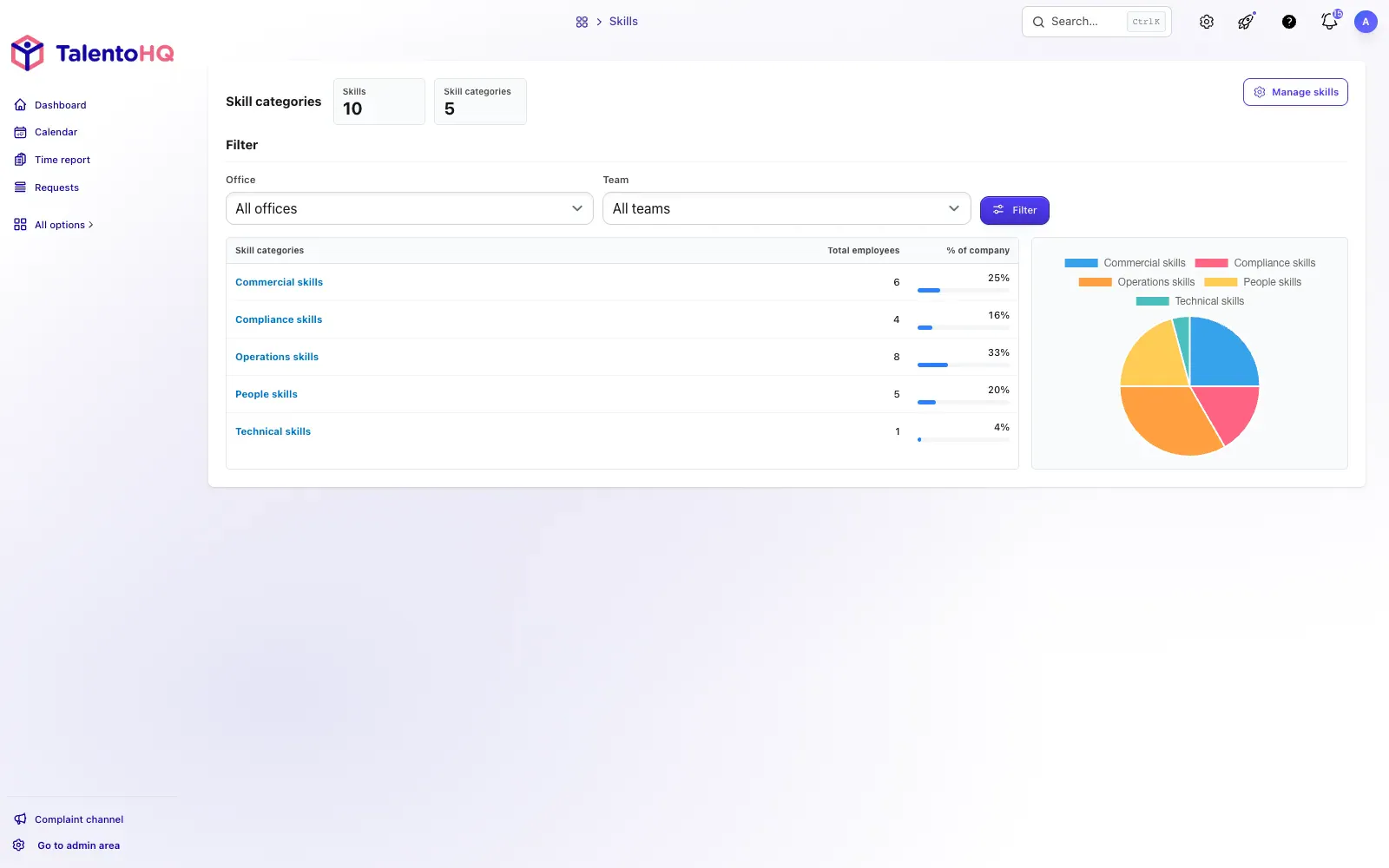
TalentoHQ lets you define how many employees need a specific skill per company, office, or team. The system automatically recalculates the compliance level and shows you on a dashboard what percentage of your workforce has each certificate up to date. If compliance drops below the target, you get an alert.
Audit-ready records
All information is centralized with a complete history: who obtained which certificate, when, when it expires, and when it was renewed. During an inspection, you can generate a report with the compliance status of the entire workforce in seconds, with charts and percentages included. No digging through folders or cross-referencing files.
Training with risk management
Training related to safety and prevention can be marked as mandatory for risk management. This visually differentiates them from the rest and ensures they receive priority in tracking and system alerts.
If you want to see how skills tracking works in detail, we have a dedicated article on how employee skills management works in TalentoHQ.
Conclusion
Managing certificates manually has a double cost that most companies only see when it's too late: fines for regulatory non-compliance and hours lost on manual tasks that never end. Both problems stem from the same cause, and they're solved with the same solution: a system that automates tracking, sends alerts on time, and maintains records that don't depend on anyone's memory.
With TalentoHQ, Maria stops cross-referencing spreadsheets and starts receiving automatic alerts. The HR department recovers hours for strategic work. And during an inspection, the records are ready with a single click.