Onboarding and offboarding software for small and mid-size teams

Onboarding and offboarding software for small and mid-size companies is a shared plan for arrivals and exits: tasks, owners, and due dates in one place. TalentoHQ starts the plan when you add an employee, and opens offboarding when a contract gets an end date.

Assign Tasks with a named owner
Track Progress on each hire
Close Access, equipment and handover
Guided demo available Cancel anytime Guided setup available

Does a new hire's first day still depend on who remembers what?


Three integrated tools

Checklists for arrivals and departures

Templates, assigned tasks and documents sit in one place. New hires follow the same steps; departing people have a list that covers access, equipment and handover.

01

Customizable checklists

Create onboarding and offboarding templates by role and department. Define the required tasks and assign owners: IT sets up system access, HR sends the paperwork, the manager organizes the first-day agenda.

Templates By role and department
02

Automated tasks

When a new employee is added, checklist tasks for that role can be assigned automatically, with deadlines, notifications and reminders. Combine it with training so required courses are part of the same plan.

Automatic Task assignment
03

Digital documentation

Contracts, internal policies, welcome guides, and other documents the new employee needs can stay in digital form. If the person came from your job postings, their details can move into onboarding without being typed again.

Digital Contracts and policies

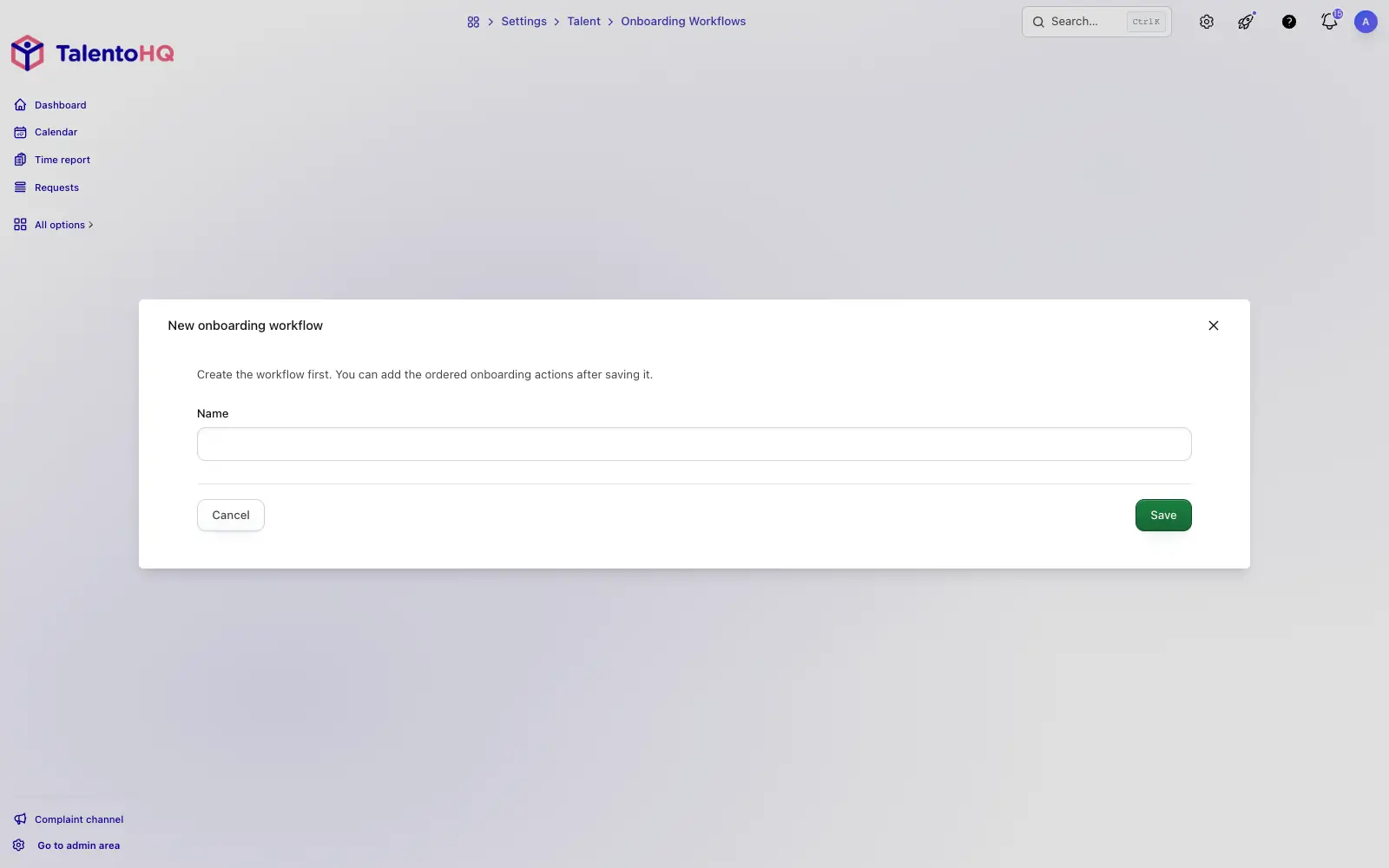
Creating a new onboarding process in TalentoHQ with tasks and assigned owners

New onboarding: create a process with tasks assigned to each owner, due dates, and progress you can check.

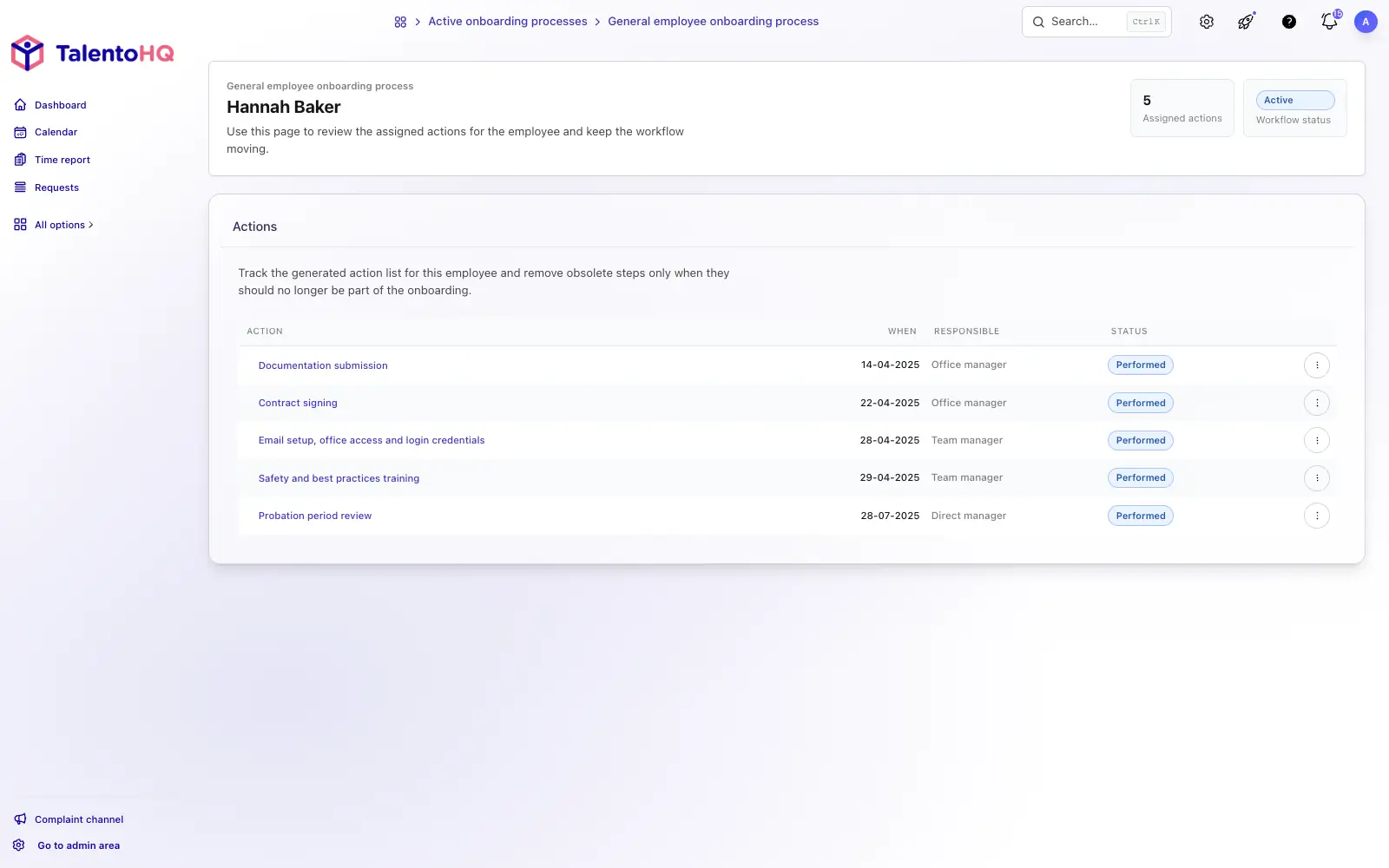
Employee onboarding process overview in TalentoHQ: general status view of each active hire

Process overview: see where each active onboarding stands.


How it works

From hire to first day in five steps

Reuse a template, assign the plan, and let each owner complete their tasks. Progress stays visible instead of living in a thread of reminders.

1

Create the template

Define the tasks needed for each role and department: preparing equipment, setting up access, sending documents, scheduling welcome meetings. Each step stays on the list.

2

Assign the onboarding

When a new employee is added, checklist tasks can be assigned to the relevant owners instead of being copied by hand.

3

Each owner takes action

IT prepares access and equipment, HR sends the documents, the manager schedules the meetings. Each person sees what they own and when it is due.

4

The employee completes their checklist

The new hire follows their own checklist: signing documents, completing training, meeting the team. They mark tasks as done as they finish them.

5

Follow progress

From the HR dashboard you can see active onboardings: who has finished their tasks, what is still pending, and where something is blocked.

Set up your first onboarding checklist

Start a 14-day trial, or book a demo if you would rather walk through templates, owners and offboarding first.

Benefits

Arrivals and exits with named owners

A complete first week is more than paperwork. Offboarding is more than a last payslip. Both work better when every task has an owner and a due date.

A stronger first impression

When equipment, access, agenda and documents are ready on day one, the new hire can start work instead of waiting for someone to remember the next step.

Fewer administrative mistakes

Checklists make it harder to skip a step. Contracts, tax information and training stay on the record with who completed them.

Offboarding with no loose ends

Revoke access, collect equipment, schedule the exit interview, and record the handover of responsibilities. Each item stays on a checklist until someone marks it done.

Scales with your team

Templates can be reused whether you hire a handful of people or many more. Tasks can be assigned automatically, and progress stays visible. Combine it with performance reviews when you want later reviews to sit next to the same employee record.


Frequently asked questions

Questions about onboarding and offboarding

What is onboarding and offboarding software?

Onboarding and offboarding software turns arrivals and exits into a repeatable checklist: tasks, named owners, and due dates. In TalentoHQ you reuse templates by role or department. The plan starts when you add an employee. Offboarding opens when a contract gets an end date, so access, equipment, documents, and handover are not left in an inbox.

Is this onboarding software for small and mid-size companies?

Yes. It is for HR managers and owners who run hiring without an enterprise HRIS. Templates, assigned tasks, and progress sit on the same employee record. Onboarding and offboarding are included in All-Inclusive: €2 per user/month billed annually, or €3 monthly, with a five-user minimum. There is no separate module fee.

Does offboarding start when a contract ends?

Yes. When a contract is given an end date, TalentoHQ opens an offboarding plan from the matching template, unless one is already open. Owners see the pending tasks. TalentoHQ does not disconnect accounts in other systems by itself: revoking access is a task on the checklist for the owner you assign.

Can I create different templates for each role or department?

Yes. You can create as many onboarding and offboarding templates as you need, each with its own tasks, owners, and deadlines. One template for sales, another for production, another for office staff.

Does the system also handle offboarding?

Yes. Offboarding uses the same pattern: checklists, assigned tasks, and progress. Access revocation, equipment return, exit interview, and handover can all be documented.

Are tasks assigned automatically?

Yes. When a new employee is added and linked to an onboarding template, tasks can be assigned to the designated owners. Each person is notified of their tasks and deadlines.

Does it integrate with the job postings module?

Yes. If the candidate came from a job posting managed in TalentoHQ, their information can move into the onboarding process so you do not have to re-enter it.

Can employees access it from their phone?

Yes. TalentoHQ works in a web browser. New employees can view their checklist, sign documents, and complete tasks from a phone, tablet, or computer.

How much does it cost? Is there a long-term commitment?

Onboarding and offboarding is included in All-Inclusive: €2 per user/month annually, or €3 monthly. Try it free for 14 days, no credit card. Cancel anytime.
Explore more

Related characteristics

Discover how other TalentoHQ features work together to offer you complete people management.