Vacation and absence management

Vacations and absences under control, no spreadsheets

Leave spreadsheets, lost emails, and manual day counting behind. With TalentoHQ your team requests time off in seconds, managers approve with one click, and the calendar updates itself.

72h Average time spent on manual management per year
3x Faster with digital approvals
0 Scheduling conflicts
No credit card required Set up in minutes Cancel anytime

How many hours does your team lose managing vacations by hand?

There's a better way.


Three pillars of management

Everything you need to manage vacations and absences

TalentoHQ centralizes requests, approvals, and calendars in a single platform. Every team member knows how many days they have left, every manager approves with full information, and every department has complete visibility.

01

Digital request and approval

Your employees request vacation or time off from their phone in under two minutes. The manager receives a notification, checks the team calendar, and approves with a single click. No emails, no paperwork, no delays. Everything is recorded alongside each person's time tracking.

<2 min Average request time
02

Team calendar

A shared calendar where you can see at a glance who's on vacation, who has sick leave, and who's working. Avoid overlaps, plan coverage, and better coordinate your team's shifts. All information in real time, accessible from any device.

Visual Shared calendar
03

Automatic balance tracking

The system automatically calculates each person's used, pending, and available days. It distinguishes between vacation, personal days, paid leave, and any other category you configure. Say goodbye to spreadsheet formulas that never add up.

Real-time Updated balance

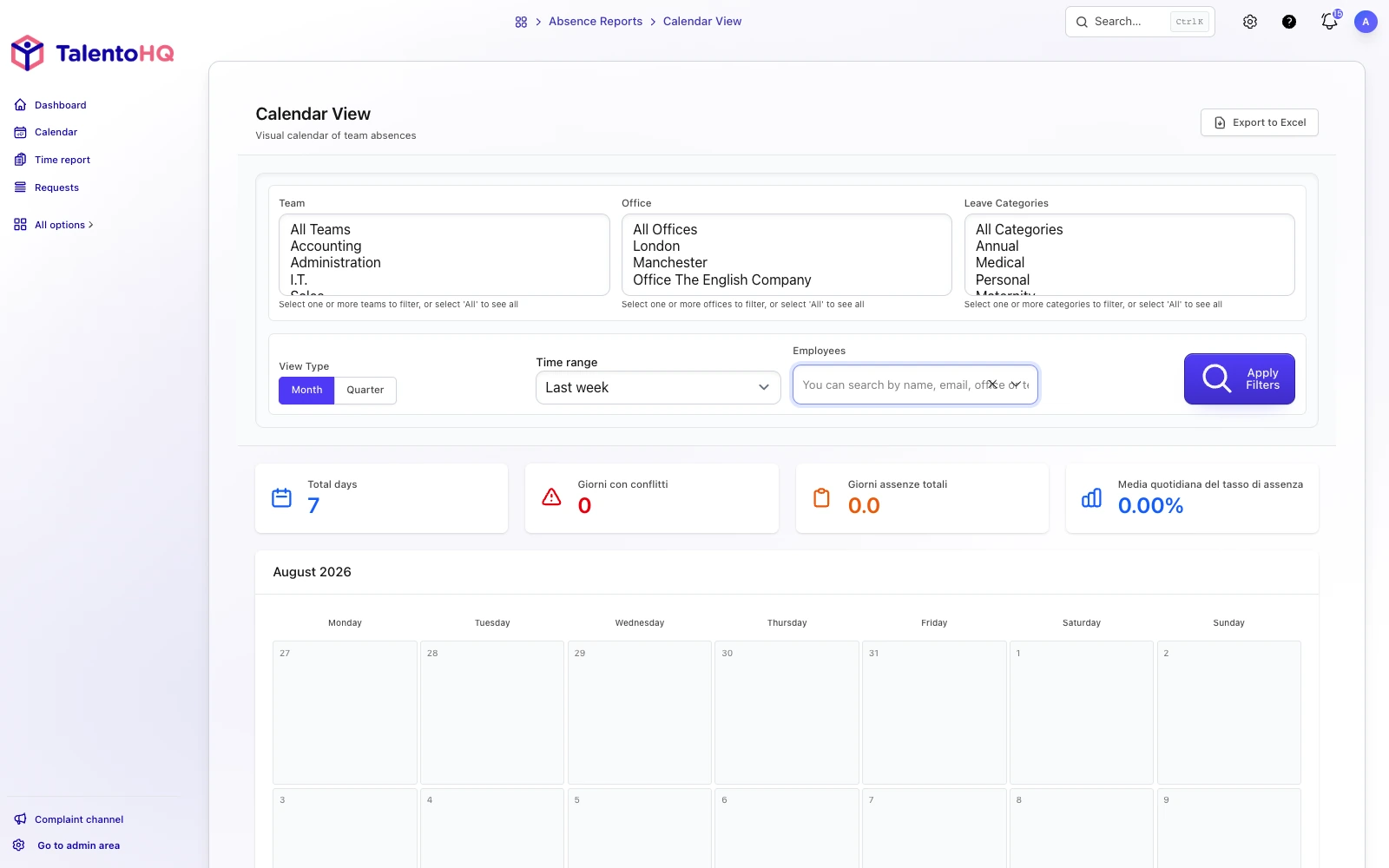
Absence and vacation tracking panel in TalentoHQ

Team calendar: see at a glance who's available, who has approved vacation, and where potential overlaps might occur.

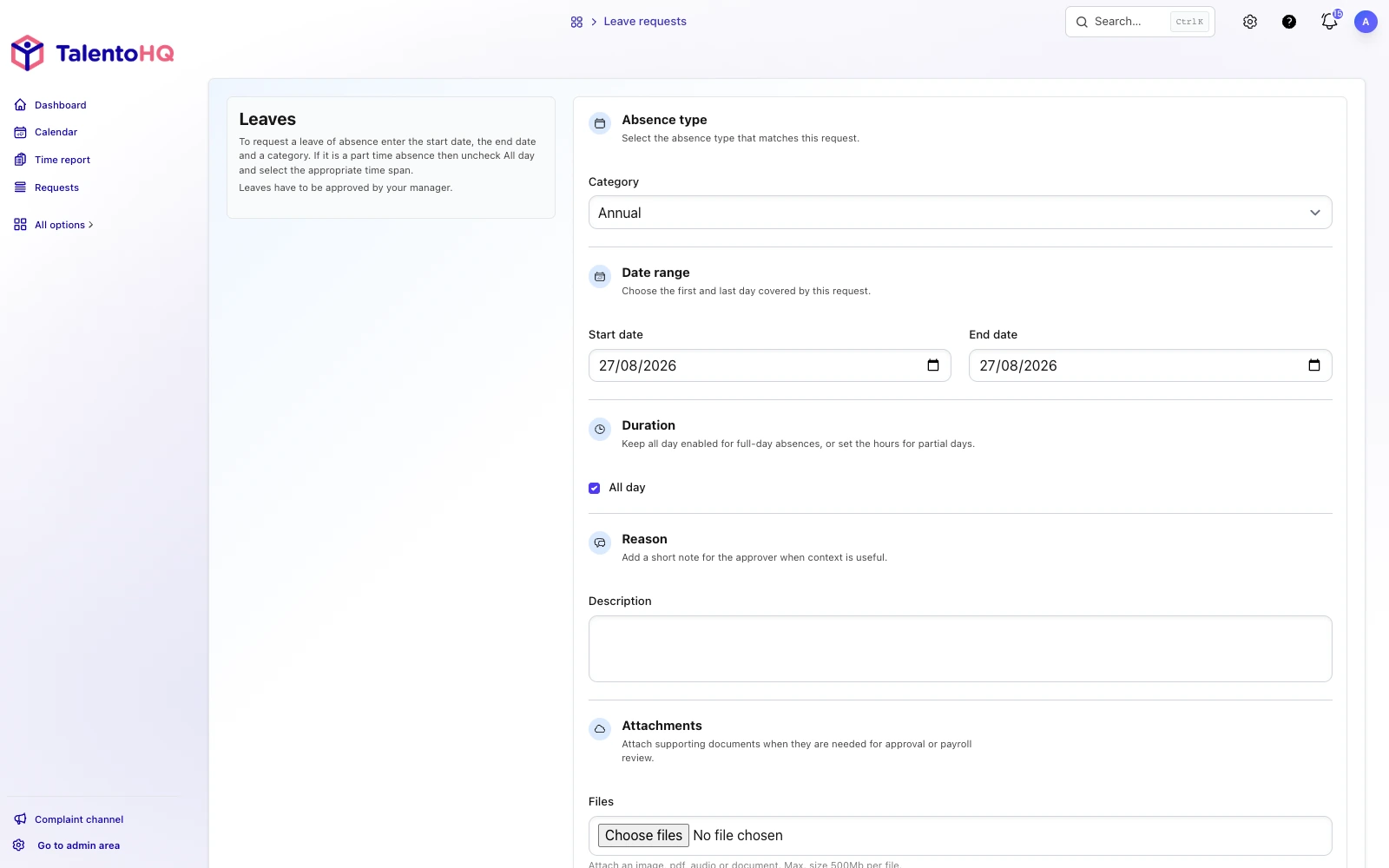
Absence request screen in TalentoHQ with date picker and categories

Absence request: the employee selects dates, chooses a category, and submits the request in under two minutes from any device.


How it works

From request to approval in 4 steps

No manuals or special training needed. Your team starts using it from day one and you stop chasing emails and updating spreadsheets.

1

Configure your categories

Define the absence types your company needs: vacation, personal days, paid leave, sick leave, or any custom category. Set the policies, annual limits, and approval rules.

2

Employee submits a request

From the web or from their phone, each person selects the dates, chooses the absence category, and submits the request. The system shows in real time how many days they have left before they submit.

3

Manager approves

The manager receives an instant notification, checks the team calendar to confirm there are no conflicts, and approves or declines with a single click. Everything is recorded with date and reason.

4

Calendar updated

The approved absence appears automatically in the team's shared calendar. Day balances update in real time and both the employee and the manager receive confirmation.


Leave spreadsheets behind for good

Try TalentoHQ free for 30 days. No credit card, no commitments. Set up vacation management for your team in minutes and see the difference.

Benefits

Absence management that works

Less time on admin tasks, fewer scheduling conflicts, and a more autonomous team. That's how good absence management improves the day-to-day of the whole company.

Fewer conflicts

When the whole team sees the same calendar, overlaps disappear. Everyone knows who's on vacation before requesting their own time off, and managers approve with all the information in front of them.

Time savings

No more back-and-forth emails, calls to confirm dates, or manual spreadsheet updates. A digital request approved with one click saves managers and HR teams hours every week.

Reliable data

Balances update in real time with every approved request. No calculation errors, no broken formulas, and no discrepancies between what the employee says and what the company has on record.

Empowered employees

Your team can check their day balance, request time off, and get a response from their phone, without depending on anyone. Through the employee portal each person manages their own vacation independently, wherever they are.


Frequently asked questions

Your questions answered

What absence categories can I configure?

As many as you need. TalentoHQ includes vacation, personal days, paid leave, and sick leave by default, but you can create as many custom categories as you like. Each category has its own annual limit, approval policy, and calendar color.

Can employees request time off from their phone?

Yes. TalentoHQ is fully responsive and works from any mobile browser. Your team can request vacation, check their day balance, and view the team calendar from their phone — no app to install.

How does the automatic day counter work?

Each time a request is approved, the system deducts the days from the employee's available balance. The counter distinguishes between different absence categories and updates in real time. Both the employee and the manager can check it at any time.

Who can see the absence calendar?

You can configure visibility to suit your needs. By default, each employee sees the absences of their immediate team and managers see all their direct reports. Administrators have full visibility across the entire company. You can also create views by department or work location.

How does the approval workflow work?

When an employee submits a request, their direct manager receives a notification by email and within the platform. The manager reviews the calendar, checks for conflicts with other team absences, and approves or declines with one click. If needed, you can configure multi-level approvals.

How much does it cost? Is there a long-term commitment?

Vacation and absence management is included in all TalentoHQ plans. You can try it free for 30 days with no credit card. There's no lock-in or fine print — cancel whenever you want.

%>
Explore more

Related characteristics

Discover how other TalentoHQ features work together to offer you complete people management.