When you publish a job posting, the text matters. But what the candidate sees before reading a single word matters just as much, if not more. Most SMEs publish their job openings as a block of text on a generic job portal, identical to every other company. The result is predictable: the best candidates choose postings that convey professionalism from the first glance.
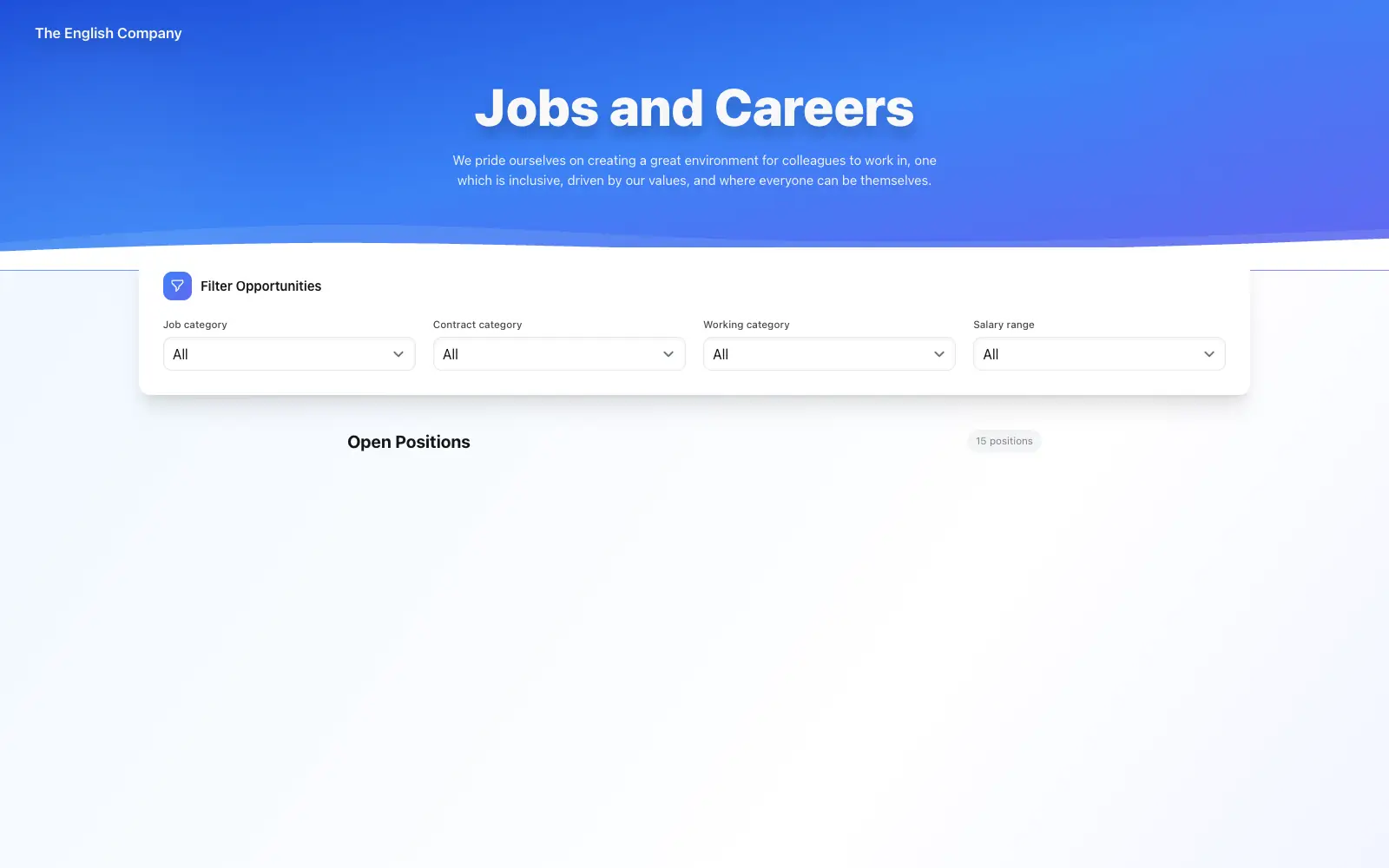
Creating a professional job posting goes beyond writing good copy. It includes how it's presented visually, how it reflects your company's identity, and what experience the candidate has when they land on your page. Here's what you'll discover what elements a good posting needs, why visual presentation makes the difference, and how TalentoHQ's new customizable themes let you have a professional-looking careers page in minutes, without a designer or technical skills.
What a good job posting should include
Before thinking about design, the content needs to be well crafted. An effective job posting for an SME doesn't need to be long or use HR jargon. It needs to be clear, honest, and useful for the reader.
A title people actually search for
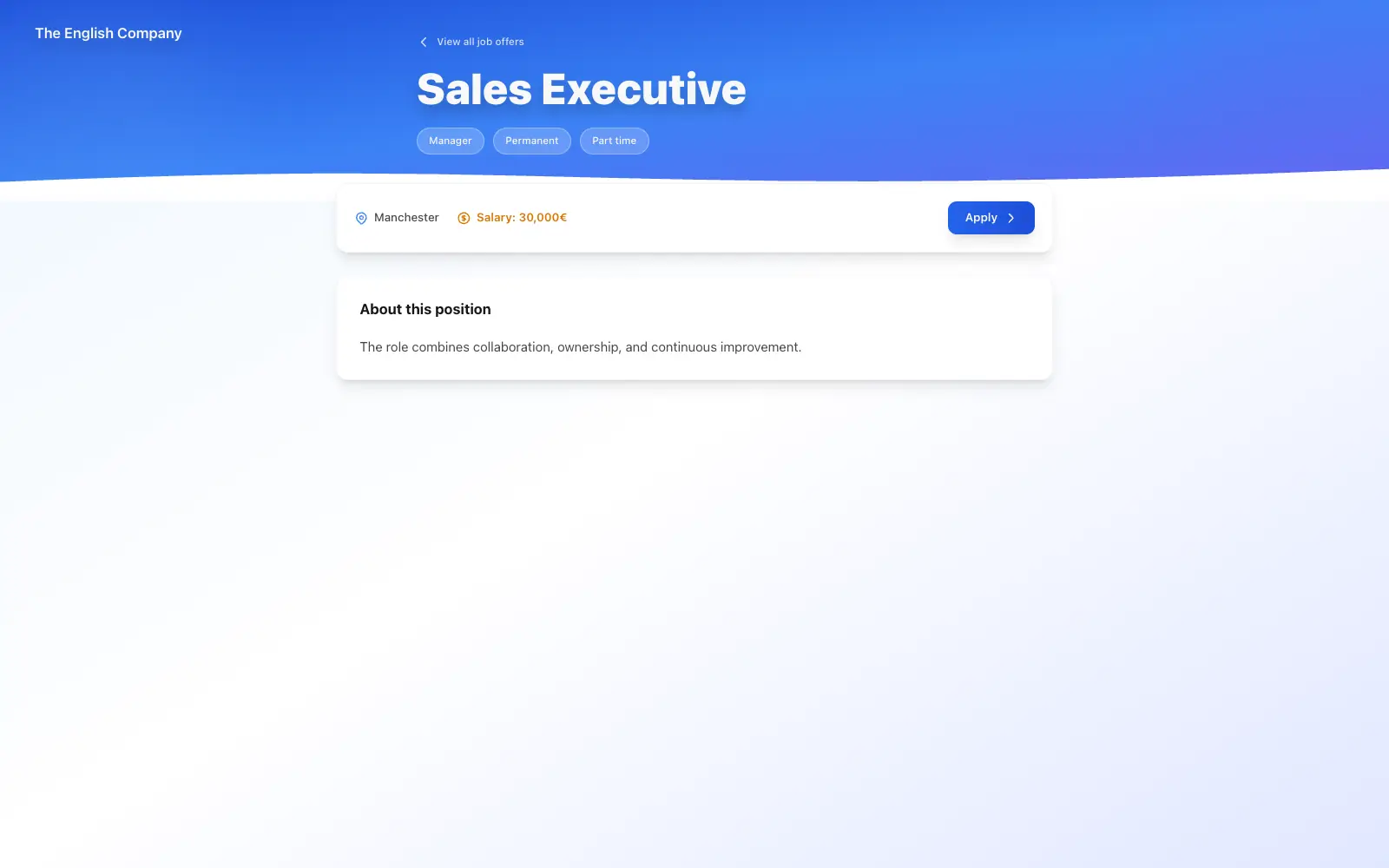
Avoid internal titles like "Position REF-2024-031" or creative ones like "Marketing Ninja." Use the actual job title as a candidate would search for it: "Sales Representative, Northern Region," "Frontend Developer," or "Warehouse Manager." If you include the location in the title, even better.
A brief introduction to your company
Two or three sentences explaining who your company is, what it does, and what day-to-day life is like on your team. Candidates want to know where they'll be working, not read a corporate description pulled from the annual report. If you're a team of 12 people with a friendly atmosphere, convey that naturally.
Responsibilities and requirements, separated
Clearly distinguish what the person will do day-to-day (responsibilities) from what they need for the role (requirements). Within requirements, separate the must-haves from the nice-to-haves. Many good candidates don't apply because they see a list of 15 requirements and assume they need to meet all of them.
Salary and conditions, with transparency
Including a salary range multiplies the number of applications. It's also important to specify the contract type, working hours, work model (on-site, remote, hybrid), and concrete benefits. "Great work environment" isn't a tangible benefit; "Friday afternoons off" or "private health insurance" are.
First impressions count: your careers page is your showcase
Have you considered what impression your careers page makes before the candidate reads a single word? This is where the conversation shifts. Every guide about job postings focuses on the text, but few talk about what the candidate sees when they arrive at your page. And it turns out that first visual impression is decisive.
A candidate actively searching visits dozens of postings a day. When they land on a professional page, with the company's colors, a polished header, and a clean layout, their perception changes. They perceive a company that takes the hiring process seriously and cares about the details. In fact, according to LinkedIn's Global Talent Trends report, candidates are up to 80% more likely to consider an offer when they recognize the company's brand.
Companies that have their own careers page -- with their logo, brand colors, and personality -- connect better with candidates from the very first moment. However, most SMEs still rely on job boards like LinkedIn or Indeed, where all postings look exactly the same. It's like showing up to an important meeting with nothing to set you apart from the rest.
Having your own job postings page, with your image and your brand, sets you apart before the candidate reads the first line. And until now, creating that page required a web developer or a CMS that most SMEs don't have. With TalentoHQ, setting up that page takes just minutes.
Customizable themes: your careers page with a professional look in minutes
That's why TalentoHQ has just launched customizable themes for the public job postings page. In practice, this means you can choose from several professional designs for your careers page and customize them with your company's visual identity, all from the admin panel and without touching a line of code.
How it works
From the job postings section in your admin panel, you access the public page settings. There you can:
- Choose a visual theme. Each theme has a different design: typography, element layout, job card style, and overall page structure. Select the one that best fits your company's personality.
- Add your header image. Upload a photo of your team, your offices, or an image that represents your company culture. It's the first thing candidates will see when they land on the page.
- Customize the welcome message. Write a presentation message explaining why working at your company is a great choice. A brief, direct message that reflects your company culture.
- Adapt the colors. Themes adjust to your brand colors so the careers page is consistent with the rest of your online presence.
The result is a public page where your active job postings appear with a professional design, with filters by location, category, and contract type, and with an integrated application form. Candidates can search, filter, and apply directly from that page.
Imagine a candidate searches for "frontend developer Madrid" and lands on your careers page. Instead of a generic listing on a job board, they find a page with your company logo, a team photo in the header, a personalized welcome message, and postings organized with clear filters. That experience conveys something no text can achieve on its own: that your company takes seriously the people it wants to bring on board. And the best part is you can have all of this ready in less time than it takes to write the posting itself.
Why this matters for your SME
You don't need to hire a designer. You don't need a web developer. You don't need to spend weeks configuring a job portal. In just a few minutes, you have a professional careers page that you can share on your social media, include on your corporate website, or add to your email signature.
Every theme is responsive, so the posting remains readable and usable on mobile, tablet, and desktop. Candidates should be able to review the role and complete the application without the page becoming an obstacle on a smaller screen.
Beyond posting: manage the entire process from one place
Creating a posting with a professional presentation is the first step, but the real value lies in what comes next. With TalentoHQ, a job posting isn't a static document: it's the entry point to a complete hiring process.
- Configurable hiring pipeline. Define the stages of your process (reception, phone interview, technical test, final interview) and move candidates between them with a visual kanban board. Each company can configure the stages it needs.
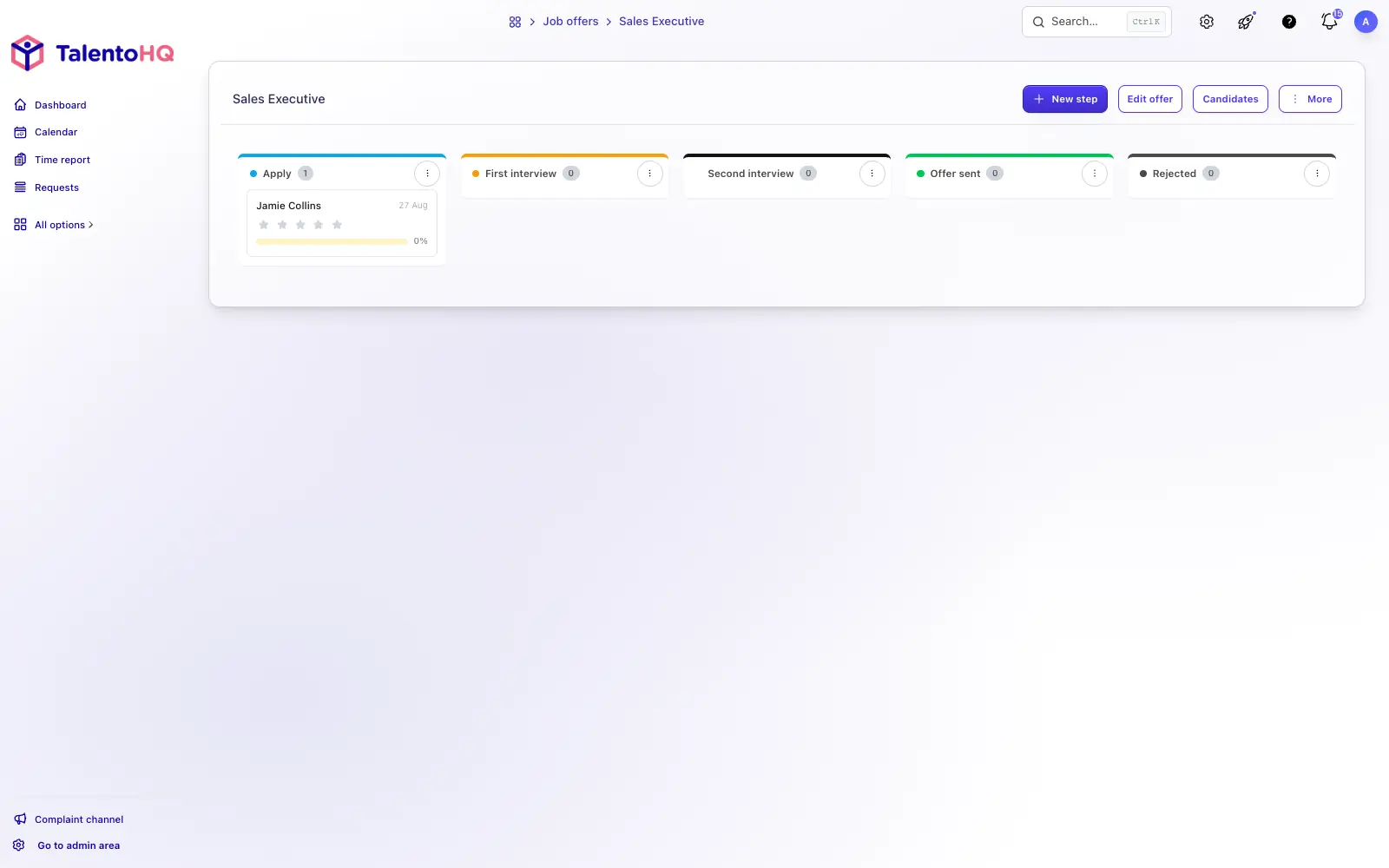
- Candidate scoring. Evaluators can rate each candidate and add comments at every stage, so the final decision is based on real data, not just impressions.
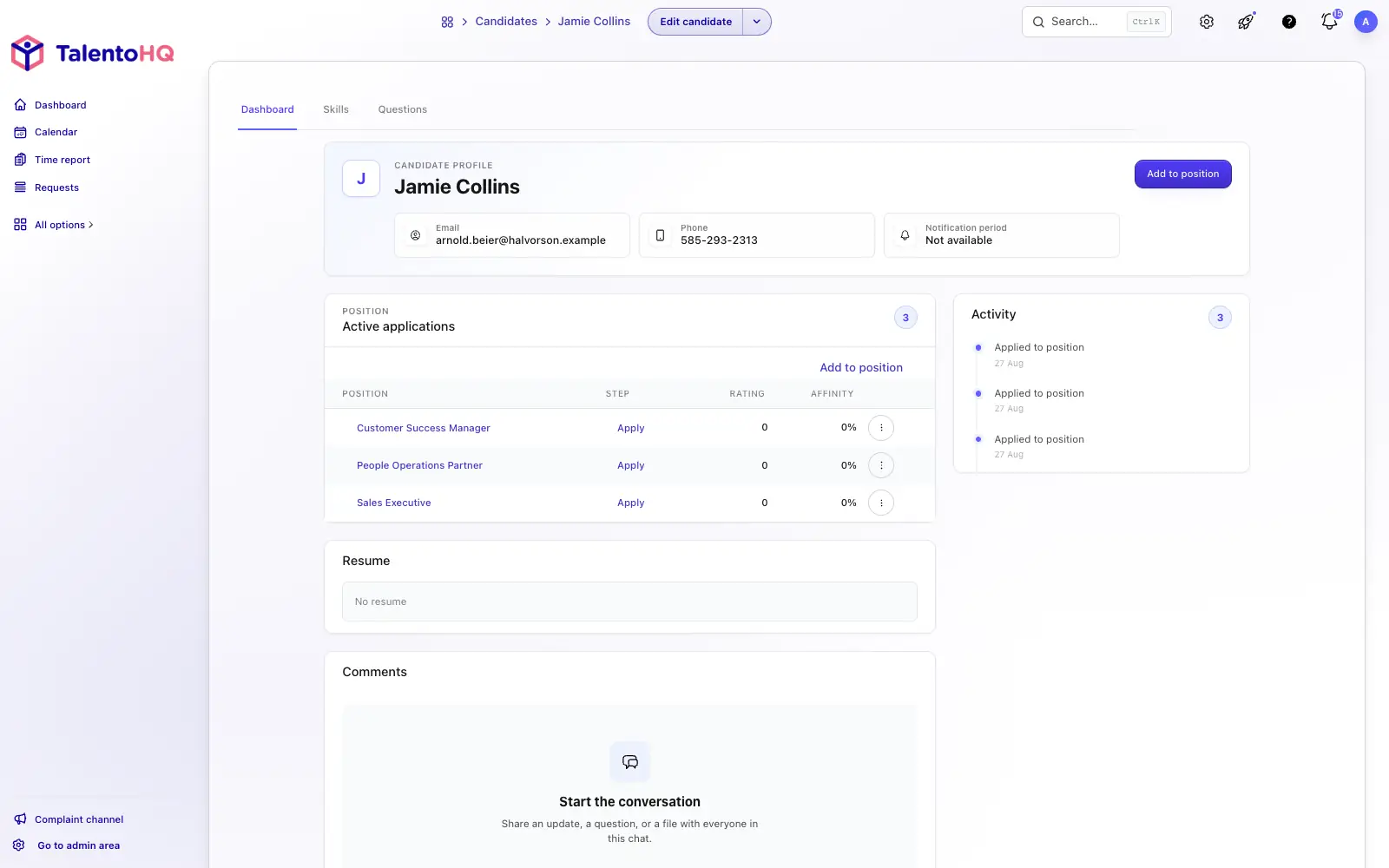
- Automatic notifications. Set up emails that are sent automatically when a candidate moves to the next stage. The candidate feels informed and you save time on manual communications.
- From candidate to employee. When a candidate formally accepts an offer, you can start their onboarding process directly from TalentoHQ, without duplicating data or switching tools.
Your job posting deserves more than plain text
Creating a professional job posting in 2026 means thinking about what you write as much as how you present it. Candidates value transparency in content and professionalism in form. With TalentoHQ's customizable themes, any company can have a professional-looking careers page in minutes, without relying on a designer or a technical team.
If you want to hire through a branded careers page, book a demo and we can walk through your first job posting. You can also start a 14-day trial.