An occupational risk alert is useful only when it leads to a decision. A red counter without an owner can become noise. A recurring review with clear criteria turns dates and statuses into actions.
A follow-up routine must distinguish what the TalentoHQ dashboard includes, what sits outside it, and who acts on each signal. The dashboard prioritizes reviews; it does not send every notification on its own or certify compliance with Spanish occupational risk prevention law.
Why due dates need context
Prevention documentation contains dates with different meanings. The next date of a medical examination is not interpreted in the same way as a PPE expiration, an assessment review, or a measure's deadline.
Article 16 of Spain's Law 31/1995 connects assessment and planning with follow-up of preventive activities. An alert should lead to a planning review when needed, even if that means the dashboard does not become empty.
Before configuring colors or lead times, define the following for each date:
- What event it represents.
- Who must act.
- What evidence will support closure.
- What happens if the date arrives and the item remains open.
- Which channel is used to coordinate the action.
Four signals that should remain separate
A prevention system contains at least four kinds of follow-up:
- Overdue medical examination. The recorded next date is today or earlier.
- PPE that needs attention. The issue has expired or has no recorded acknowledgment.
- Assessment due for review. Its review date is today or earlier.
- Overdue measure. It remains pending or in progress after its planned implementation date.
Each signal opens a review task. It does not complete the action or explain its cause. An appointment may already be scheduled, a measure may have been implemented but not documented, or a date may need correction because the plan changed.
How TalentoHQ identifies items that need attention
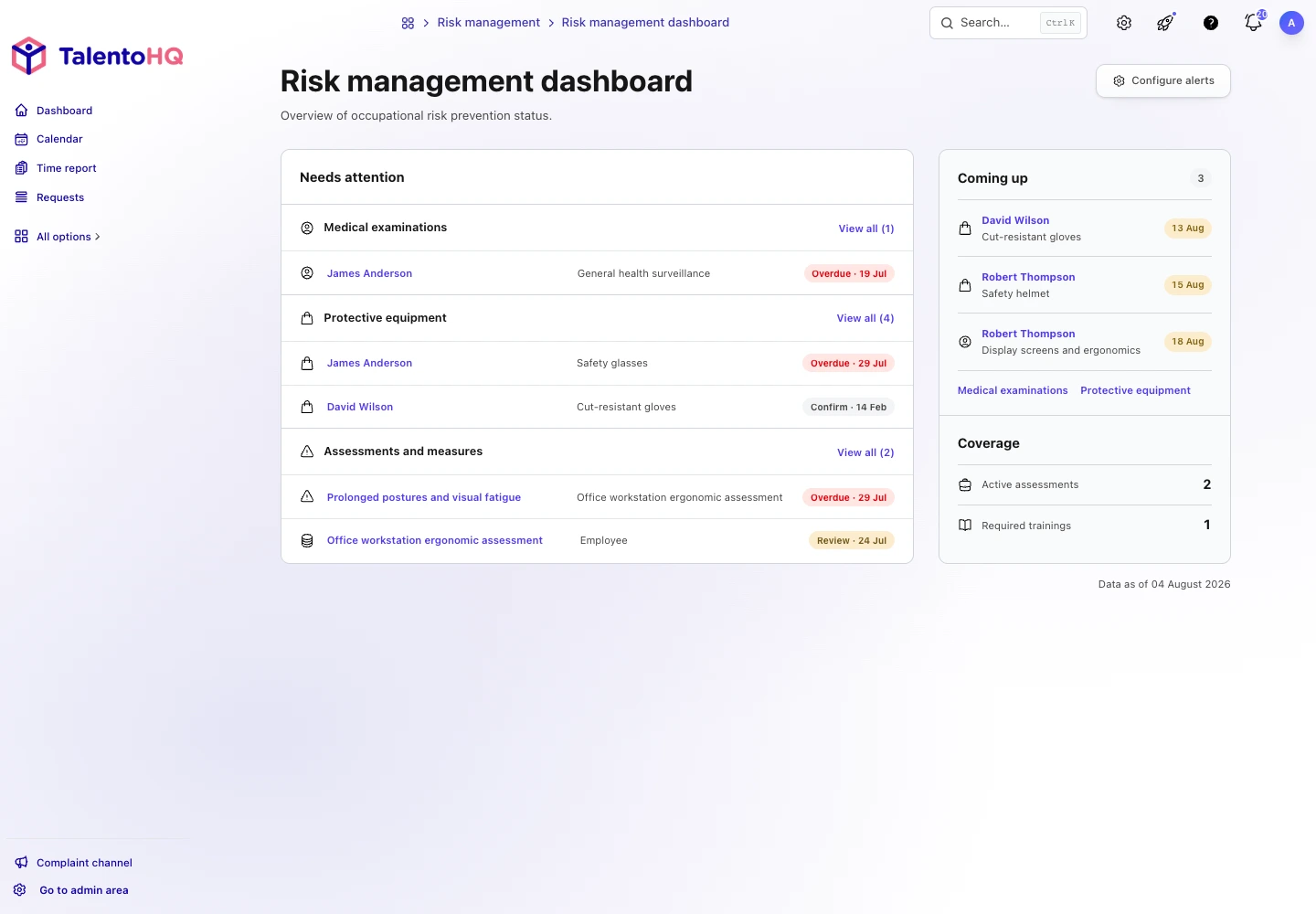
The occupational risk dashboard presents three groups under Needs attention:
- Medical examinations. Includes records whose next date has arrived.
- Protective equipment. Includes issues that have expired or have a pending recorded acknowledgment.
- Assessments and measures. Shows overdue reviews and open measures that have passed their deadline.
The view presents a selection of priority items and the total for each group. The View all link opens the corresponding list so work can continue.
An assessment can appear when it is in draft or archived. Status and review date are independent: changing the status does not automatically remove a commitment linked to a recorded date.
Coming up uses a fixed window
Coming up includes medical examinations and PPE issues whose date falls between tomorrow and the next 30 days. It does not include future assessment reviews or future dates for preventive measures.
The 30-day window is fixed. This makes the dashboard stable to read, but the limitation matters when the company designs its routine. A business that must prepare certain equipment earlier will need to complement this view with its procedures and lists.
The section displays up to three immediate items and the total. If the counter shows more records, the complete list contains the rest.
Alert settings and notification delivery
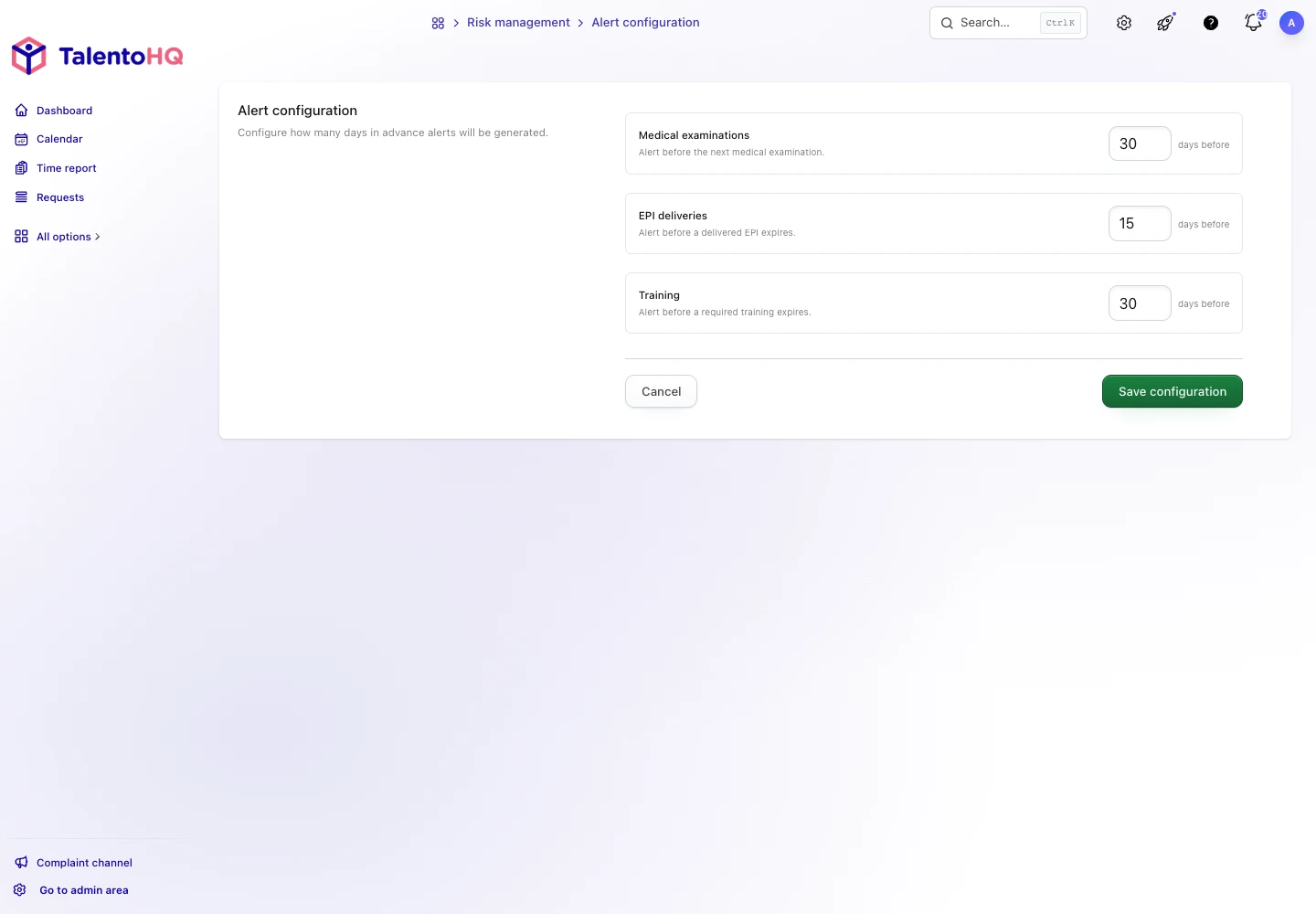
TalentoHQ can save preferred lead times for medical examinations, PPE issues, and required training. Those values do not currently change the Coming up window, and they do not send emails or notifications on their own.
The internal procedure should make this distinction clear. Saving “30 days” expresses a setting, but it does not prove that someone received an alert. If the company uses reminders through other channels, document who generates them and how receipt is verified.
To review these screens against your prevention calendar, you can request a personalized demo with no commitment.
Coverage does not mean compliance
The dashboard shows two metrics: active assessments and courses marked as required for occupational risk prevention. They are counts of configured records, not percentages of people covered.
An active assessment can have open measures. A required course can have people who have not completed the content. Coverage provides a shortcut to the inventory; it does not certify compliance or determine the company's prevention status.
Open Training to review participation and completion. Open each assessment to understand its scope and measures. The guide to occupational risk prevention training explains how to connect both levels without duplicating information.
A weekly and monthly routine
Frequency depends on the activity, but the work can be divided into two layers:
Weekly operational review
- Check new overdue items.
- Assign or confirm an owner.
- Record completed actions.
- Escalate critical or blocked measures.
- Avoid changing dates without a documented decision.
Monthly quality review
- Review upcoming items and resource needs.
- Find records with no dates when follow-up should be scheduled.
- Check active assessments and open measures.
- Compare required training with participation and completion.
- Review permissions, owners, and data consistency.
The meeting should end with decisions: an owner, a next action, and a date. Reviewing counters alone turns the dashboard into a snapshot with no management behind it.
When a task is blocked, record the reason and escalation decision. The next review then starts with context instead of repeating the same check from the beginning.
How to investigate an item that keeps appearing
When an alert remains, review the field that generates it:
- For a medical examination, the next date.
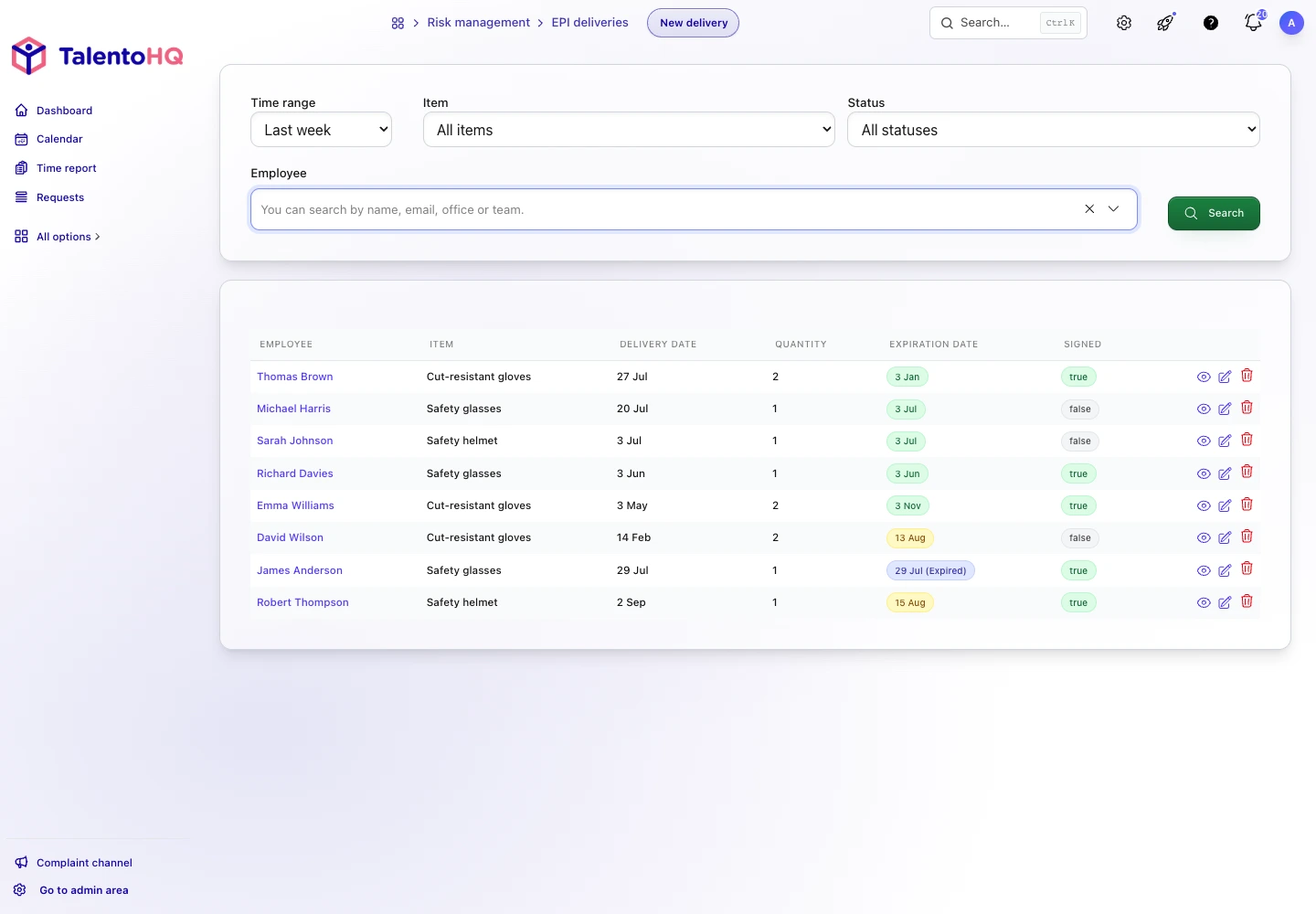
- For a PPE issue, the expiration date and acknowledgment status.
- For an assessment, the review date, even when its status is draft or archived.
- For a measure, the implementation date and whether its status remains pending or in progress.
Updating another field does not remove that condition. This rule prevents a general label from hiding a specific time commitment.
Assign owners by alert type
Not every signal should go to the same inbox. HR can coordinate medical examinations; the storeroom or prevention team can handle PPE replacements; the owner of an assessment can manage its review; and each operational owner can manage assigned measures.
One person should oversee the whole process, verify that every group has an owner, and escalate blocked work. Specific tasks remain with the people who manage each area.
When an owner changes roles or leaves the company, open measures and reviews must be part of the handoff. Otherwise, the system retains visible dates but nobody recognizes the task as their responsibility.
Example of a 15-minute review
The dashboard shows an overdue medical examination, an expired issue of safety glasses, gloves with a pending acknowledgment, an overdue ergonomic measure, and an assessment whose review date has arrived. The coordinator does not change any dates when the meeting starts.
First, the coordinator confirms that the medical appointment has been booked and assigns HR to update the record when the new conclusion arrives. Next, the team confirms that the glasses were replaced, but the replacement has not yet been recorded. The gloves were issued; the company's acknowledgment process still needs to be completed.
The ergonomic measure remains in progress because two workstations still need adjustment. It stays open, and the team agrees on a new action with its owner. The assessment will be reviewed after those adjustments, so its owner keeps the task and documents the agreed schedule.
The meeting ends with confirmed facts, assigned tasks, and data that will be updated when evidence exists. The dashboard may continue to show alerts. Traceability matters more than making indicators look artificially clean.
The coordinator records when each task will be reviewed again and which blocker should be escalated to senior management or the prevention service.
Frequently asked questions about occupational risk alerts
When does the 30-day window start?
Coming up includes dates from tomorrow through 30 days after the dashboard date. Records dated today are already overdue or need attention.
Does Coming up include future assessment reviews?
No. Assessments enter Needs attention when their review date arrives. To anticipate them, use the assessment list and the company's defined routine.
Does saving a lead time send an email?
Not on its own. The screen stores the configured lead times, but it does not prove that a notification was generated or delivered.
Why does an archived assessment appear?
Its review date has arrived. Status and date are independent. Review whether the date should remain, be updated, or be documented through a new assessment.
How is an overdue measure closed?
Record the real action and change the status when appropriate. If the measure has not been implemented, keep it open and review the plan.
Does the dashboard show every item?
It shows a prioritized selection and the total for each group. Use View all to work with the complete list.
Conclusion: turn every alert into a task
An occupational risk alert needs a defined meaning, an owner, and a planned action. TalentoHQ brings dates and statuses together to prioritize review. The company and its prevention professionals remain responsible for coordination and verification.
The next review should end with three data points for every alert: what was checked, who owns the next step, and when it will be reviewed again.
See the complete occupational risk management guide for Spanish SMEs to place these alerts in the wider prevention cycle.