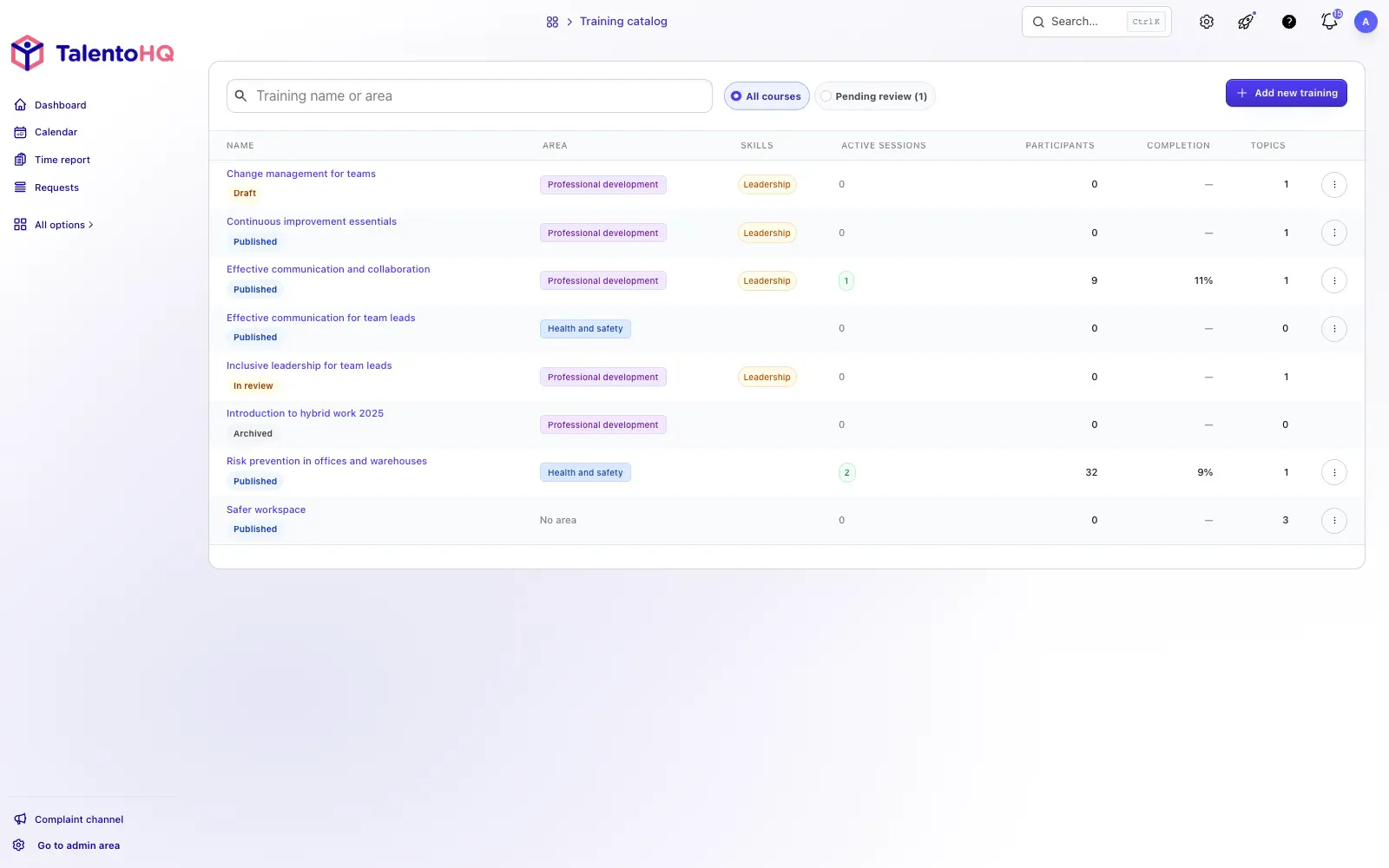
TalentoHQ lets a company create courses with PDF, video or audio resources, assign them to an employee, team or office, and review who has completed them. Employees find pending learning in their own workspace; HR can see progress without asking for confirmations by email.
For required training, define who it applies to, which resources must be reviewed and what completion evidence is needed. Once an employee completes the course, the status remains recorded; if someone is still pending, the training owner can identify them and follow up.
The LMS shares an environment with employee profiles, skills and certificates. If training renews a skill, add the new certificate to the employee record and update its expiry. That continuity between the course and the employee file is more concrete than claiming the platform will “motivate” a team.
How a course is organized
- Create the content. Add topics, sections and PDF, video or audio resources.
- Assign participants. Select an employee, team or office.
- Communicate the training. Employees receive the assignment and access it from their workspace.
- Review the status. HR can distinguish between completed, started and pending participants.
View the course-management screen
From the course to the employee record
Training can form part of onboarding and be linked to skills or certificates. When reviewing the workflow, confirm that the course status, associated skill, supporting document and expiry date agree.
What the company should review
Before assigning a course, define who must complete it, which result needs to be retained and who will follow up with pending participants. Those decisions turn a progress panel into a management tool instead of a simple content list.