
An annual training plan gives you a clear view of what your team will learn during the year: which trainings there will be, when each one will happen and how much you plan to invest. You prepare it once, with dates, hours and planned cost, and adjust it as the year goes on, with your original plan always in view.
This is the first article in a series that follows training in TalentoHQ from the plan to tracking results. As an example we use our first course, on working-time record, which we are preparing (in Spanish, for employers in Spain). This article covers the first stage of that route: how to go from what your team needs to learn to an annual plan with concrete training actions, inside Training in TalentoHQ.
Start with what your team needs to learn
A good plan starts from real needs, and in TalentoHQ they reach you from three sources. The first is what you see as a manager, for example a new tool, a change in the way you work or a team that is growing.
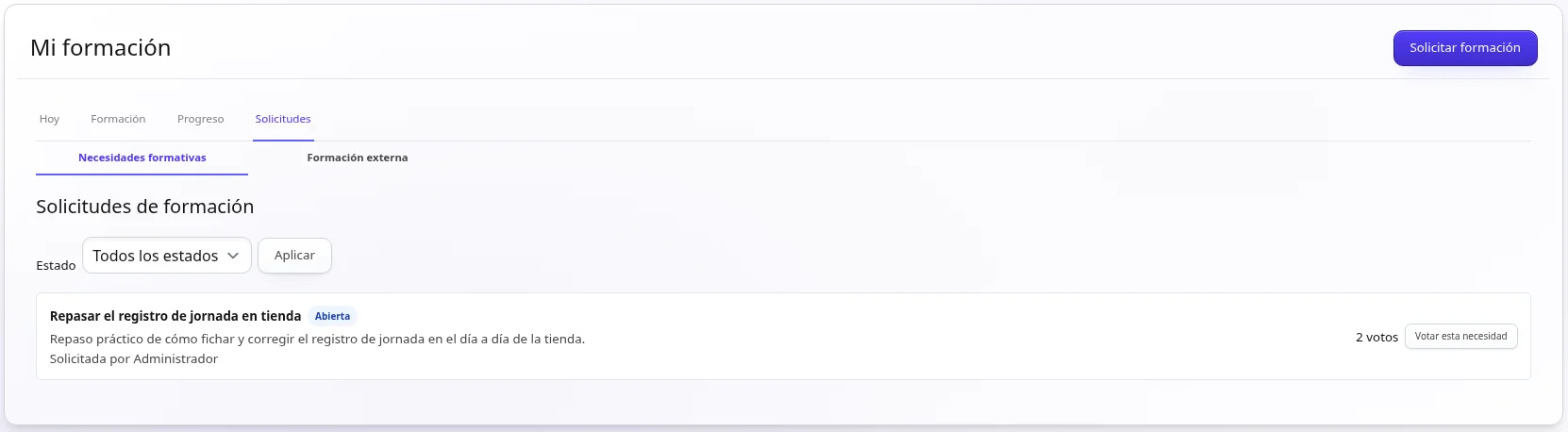
The second comes from your people themselves. From “My learning” they can request training and vote for the needs their colleagues have suggested. You then see which topics matter to more people on the team. Whoever manages training can link each need to an action in the plan, create a draft course from it or decline it with an explanation.
The third is “Training compliance”, where you see the training requirements of each role by status. When a role requirement is not covered yet, “Add to plan” turns it into a training action. Adding the action to the plan does not mark the requirement as met. That way the plan includes, from the start, what each person needs for their role.
Create the plan for the year
In the Training section, under “Training plans”, you create one plan per year, and one per company if you manage several. The plan brings together every training action you have planned for that year, along with its status and your notes. It keeps all the year's planned training at hand in one place. People with management permission can view it whenever they need to.
You'll find the step-by-step detail in the guide to creating and reviewing training plans.
Turn each need into a training action
Each training action is a line in the plan that says what will be learned, when it will happen, how many hours it takes and with what budget. You can also note the reason or need behind it and, if there is one, the provider.
You can create the action before you have the course. Meanwhile the plan shows it as an action still waiting for its course. As soon as you choose a course from the “Course catalog” or link an event, the action records it. That way you plan now and choose or prepare the course later.
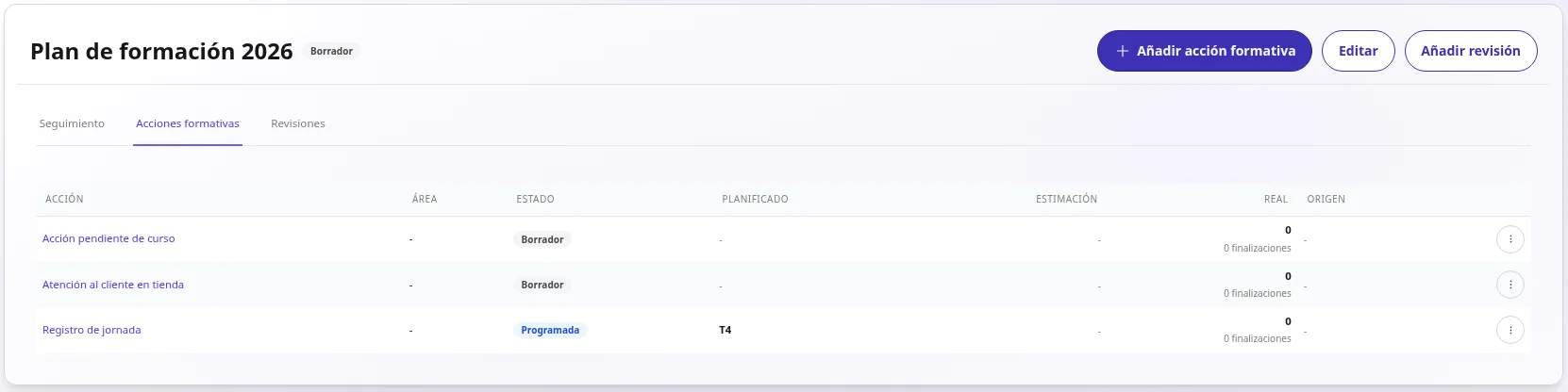
In our example, the action would be «Registro de jornada» (working-time record), planned for the fourth quarter, with its estimated hours and cost and the status “Scheduled”. The course can come later and what you have already planned stays in place. When you publish the event, you'll choose shop staff as participants.
Plan when it will happen and who will take part in the event
In “Planning” you decide whether the action stays as a “Draft” or is already “Scheduled”. You set when it will happen, how many hours it will take and what cost you estimate. You add the actual cost once you know it. That way you can see when each training will happen and what hours and cost you have planned.
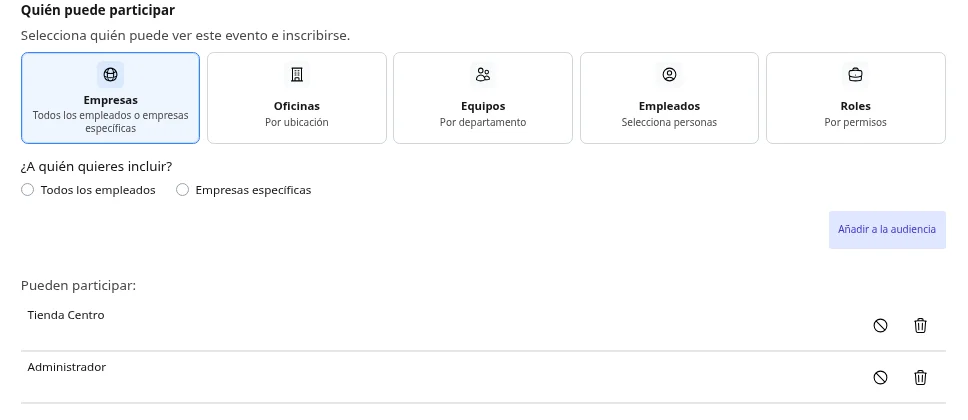
You choose who takes part when you publish the training event, when you set who can take part in its enrolment. That way each session reaches exactly the people who need it.
Connect the plan with courses and their results
Training events are published from the catalog course. Once an event is published, you link it to the action in the plan. From then on, linked events feed the action with participants, hours and completions. The “Planned vs actual” block compares dates, hours, participants and cost.
If you want to measure the impact of a training, you can mark the action as “Evaluation required” and record its effectiveness afterwards. That way the plan shows what actually happened, in the same place where you planned it. You'll find more on courses, events and tracking on the TalentoHQ training page.
If your team repeats certain trainings every year, learning paths help you organise them as a continuous route.
Review the plan during the year
With “Add review” you open a dated review session where you go over the plan's actions. In it you can change dates or statuses, for example mark an action as “Completed” or “Cancelled”, add notes or add new actions. Each review is saved, so you always know what was decided and when.
To see the whole year, the “Training plan execution and evaluation” report, in “Reports”, compares what was planned, the actual activity and every review. That way the plan adapts to what happens during the year and keeps its history.
AI as support for your training
The TalentoHQ personal assistant works with your company's real data and always within your permissions. You write to it in your own words, without commands, for example to look up the courses in the catalog and how each one is organised.
When the plan is ready, AI also helps you with the next step. You can ask it to create a course with its topics, lessons and content, and the course is saved as a draft for you to review before publishing it. AI prepares and suggests, and you review and decide. AI is optional.
Try TalentoHQ
In the next article in this series you'll see how a course is created with the help of AI. Meanwhile, you can see how TalentoHQ works with your own team.
Frequently asked questions
What is a training action?
It is a line in the annual training plan that says what will be learned, when, with how many hours and with what budget. It can be linked to a course from the catalog and its events, where you choose who takes part.
Can I plan a training if I don't have the course yet?
Yes. You create the action with its planned dates, hours and cost, and the plan shows it as waiting for its course until you choose one or link an event.
Who can create and change the plan?
Administrators create and edit plans. People with management permission can view them and, in a review, change dates, status and notes, and add actions.
How do I know whether the plan has been met?
Each action shows “Planned vs actual”, and the “Training plan execution and evaluation” report compares the forecast with the activity and with each review of the plan.