A regular one-to-one is the conversation where each person and their manager go over progress, the support they need and the next steps. When your team shares feedback between meetings, you arrive at each conversation knowing what everyone is working on.
With TalentoHQ you can prepare, run and follow up your one-to-one meetings. Meetings are part of talent management, alongside surveys, feedback and goals, so inside the meeting itself you can check the person's recent feedback and goals. HR can also prepare the questions for you, so every manager starts their individual meetings from a common starting point.
How to schedule recurring one-to-one meetings
You create the meeting with the person, give it a name that reflects its purpose, and set the duration and whether it's a one-off or recurring, for example every two weeks. The meeting appears in the TalentoHQ calendar and the person sees the appointment.
With a fixed slot, the person knows when they'll have that time with you and can jot down the topics they want to raise. You don't need to choose the questions yet. You pick them later, inside the meeting.
One-to-one meeting questions prepared by HR
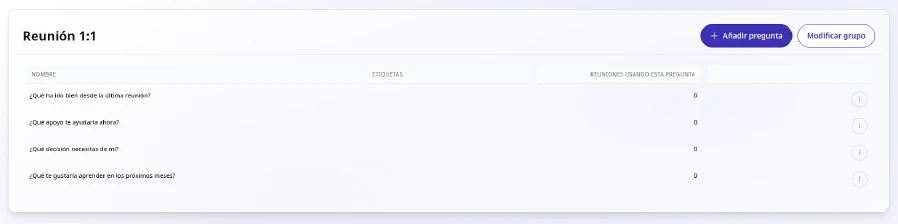
HR can prepare question groups for the whole company. You find them ready inside the meeting, so you don't need to write your own before each conversation. If you want to tailor the discussion to your team, you can also add your own questions.
When the whole company uses the groups HR prepares, everyone has meetings with the same basic structure, whatever their team. Groups work best with a few questions, ordered to follow the natural flow of the conversation and designed to invite examples. Some that HR could include:
- What has gone well since our last meeting?
- What support would help you right now?
- What decision do you need from me?
- What would you like to learn in the coming months?
Reviewing employee feedback and goals in the meeting
Inside each meeting you can see the person's recent feedback and their goals. Look through them for a few minutes before you start, so you arrive with concrete examples and know where each goal stands.
If a comment catches your attention, ask about it in the meeting before drawing conclusions. With the goals in front of you, you can recognise specific progress and agree on the support the person needs for the next step. For ideas on setting those goals, see creating and tracking objectives and OKRs.
Continuous feedback between meetings with the Workplace Climate pulse
Between meetings, the Workplace Climate pulse sends a short question to the team, by email, or by Slack if you've connected it, as often as your company chooses. Each person answers with a rating and, if they like, a comment. A good comment covers completed tasks, pending tasks and planned work, plus anything else the person considers relevant.
You can see those answers by team and by person and reply to each one, and the person sees your reply next to their comment. A good reply shows you've understood and explains what will happen, who owns it and when.
If a comment raises a topic that needs more time, note it down for your next meeting. To turn survey results into concrete action, see our guide to workplace climate surveys.
Questions and notes during the meeting
When you open the meeting, you choose today's questions from the available groups. TalentoHQ shows you when you last used each one, so you avoid repeating the same ones and can see how long it's been since you covered a topic. The questions guide the conversation and have no answer or rating field, so you capture what matters in your notes. If one doesn't fit, you can remove it.
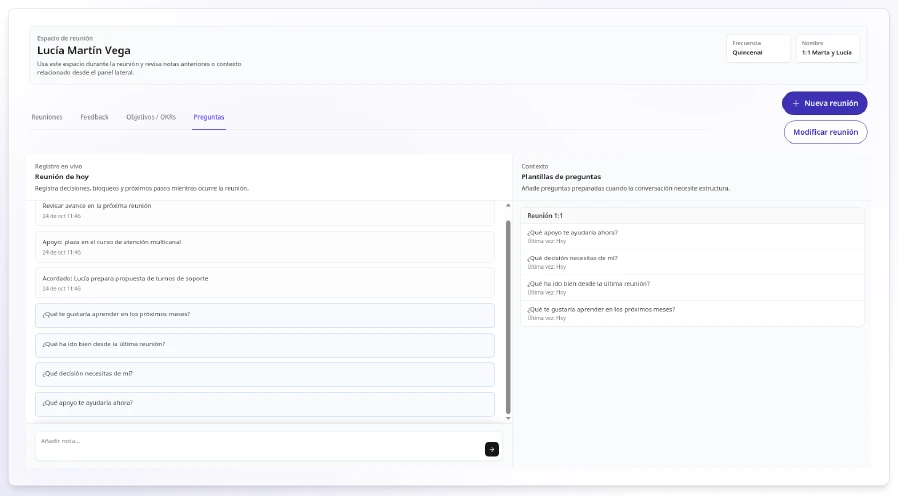
As you talk, you record decisions, blockers and next steps in the meeting notes. Write one note per topic and only what you need for professional follow-up. Notes are recorded in today's meeting, and you can open earlier dates in read-only mode whenever you want to review what was discussed. They're encrypted and stored in the organiser's space. The participant sees the appointment, and the notes stay with the organiser.
Start with the person's topics. To help them come prepared, you can suggest they think about their progress since the last session, anything blocked or awaiting a decision, the support they need, their development topics and next steps.
Following up meeting agreements with goals and tasks
Only you, as the organiser, can see the meeting notes. If an agreement stays only in your notes, the other person can't see it and it's easily forgotten. So when the meeting ends with a commitment, record it in Goals with a date and share the goal with the person. That way the person sees it and you can follow its progress. For example, if you agree that they'll prepare a proposal for a client by the 15th, create it as an action inside their goal with that date. At the next meeting, you just review where it stands. Depending on the agreement, you have three ways to record it:
- As an action inside an existing goal, with its date, ticked off when it's done.
- As a new goal in Goals and OKRs, with dates and regular updates, when the commitment deserves its own goal. The person can create it themselves and become its owner, or you can create it and share it with them.
- As a task in Tasks, with an owner, a date and comments, for one-off agreements that aren't part of any goal.
Each goal also has its own message thread, where you and the person put in writing the decisions you make along the way.
Continuity between meetings: previous notes and progress
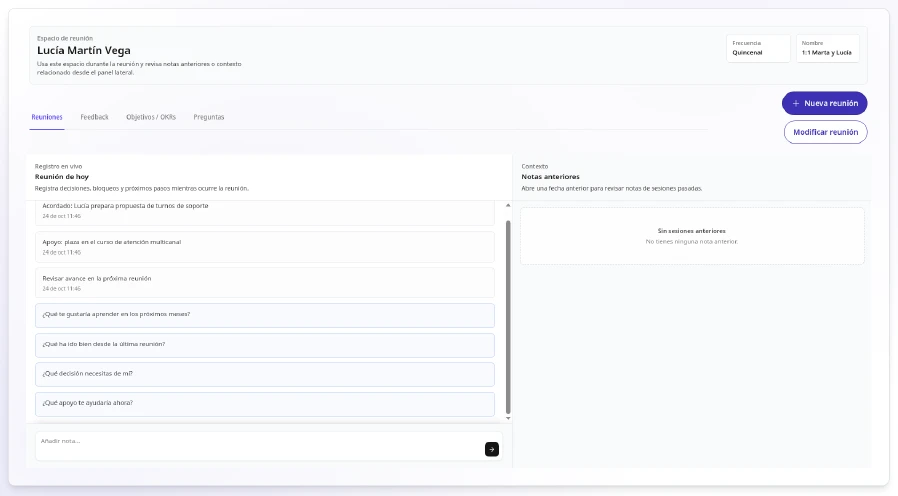
Before the next meeting, open the notes from the last one to recall what you agreed. Then check the completed actions and updates in Goals to see what has moved forward, and read the feedback the person has sent since then in Workplace Climate. With that, you can start by recognising what's already done and spend the rest of the time on what's still pending.
The notes and goals from these meetings also help you in the performance review, because you arrive with concrete examples from the whole period. See how they fit together in the performance evaluation guide for SMEs.
AI to help you prepare conversations with your team
If you turn on TalentoHQ artificial intelligence, you can ask in plain language what you want to know before an individual meeting, without clicking through menus. For example: "How are my team's goals doing this quarter?" or "Before the meeting, tell me which tasks are still open and which steps are missing."
After the meeting, you can ask it to create a goal or a task from a single sentence. You'll see a preview and you confirm before anything is saved. It always works within your permissions. The conversation and the decisions remain yours and your team's. It's optional and billed separately based on usage.
With TalentoHQ, you prepare each meeting with the person's feedback and goals and turn what you agree into goals or tasks.
Frequently asked questions about one-to-one meetings
How often should you hold one-to-one meetings?
Choose a rhythm you can keep up, for example every two weeks, and set it up as a recurring meeting in TalentoHQ.
Who can see the notes from a one-to-one meeting?
The person who organises the meeting. Notes are encrypted and stored in their space.
Who prepares the questions for individual meetings?
HR can prepare question groups for the whole company, and every manager finds them ready in their meetings, with the option to add their own questions too.
Do I have to use every question in a group?
No. Choose only the ones that add structure to today's conversation, remove the ones that don't fit and, if you like, add your own.
What do I do with what we agreed in the meeting?
Record it in Goals, as an action inside a goal or as a new goal, with its date and shared with the person. If it's a one-off agreement that isn't part of any goal, create it in Tasks.
How is a one-to-one meeting different from a performance review?
A one-to-one meeting is a recurring conversation about progress, support and next steps. A performance review is a structured cycle with templates and competencies. The notes and goals from your meetings give you concrete examples for the review.